Getting Started — +1 Paint Keyboard Adventure
A full first-session guide to painting keyboards, banking wins, buying Range, and knowing when rebirth comes later.
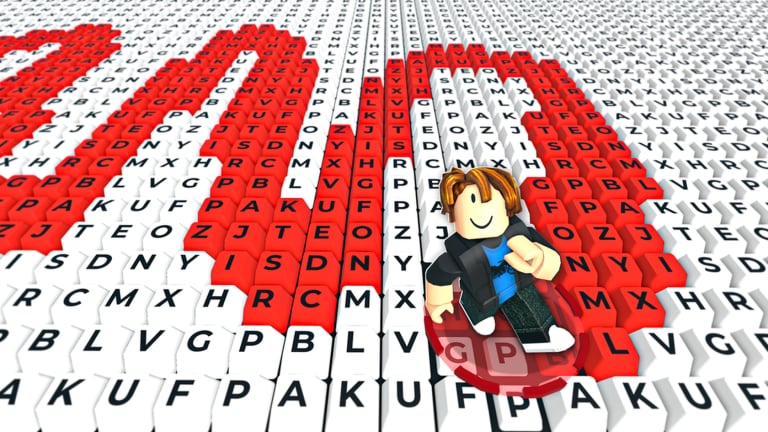
Welcome to +1 Paint Keyboard Adventure
+1 Paint Keyboard Adventure is a free-to-play Roblox incremental simulator from NoYep Games. You spawn onto oversized keyboard stages, run across the keys, and paint them. Every key you paint makes your character faster. Finish an entire keyboard to earn wins. Spend those wins on upgrades — especially Range, which lets you paint more keys in a single pass — then eventually Rebirth to break through plateaus and push your limits. Servers are online multiplayer with up to 22 players. The game released on 1 August 2026 and remains actively visited into October 2026.
This beginner guide walks you through your first sessions without inventing fake prices or secret codes. For rankings, see the Tier List Hub. For device-specific movement, see the Players Hub.
Step 1 — Join and learn the paint loop
Open the official place from our Links Hub or Roblox search. After you load in:
- Move across keys you have not painted yet.
- Watch your speed climb as coverage increases.
- Keep painting until the board is complete enough to cash in wins.
The important mindset shift: speed is a reward for painting, not a reason to ignore unpainted tiles. Zooming in circles on finished sections feels fast but stalls your win rate. Aim your path through fresh keys inside whatever paint radius you currently have.
Step 2 — Complete keyboards for wins
Wins fund your future. Treat each keyboard like a short objective:
- Scout which regions are still blank.
- Sweep them methodically (rows or quadrants).
- Finish the board and secure the win reward before you wander to a shop binge mid-clear.
Deep tactics live in How to Get Wins. Early on, even one clean clear teaches more than three aborted attempts.
Step 3 — Buy Range before luxury upgrades
The official loop calls out Range for a reason. A larger radius paints more keys per second of movement, which raises speed sooner, which finishes boards sooner, which buys the next Range tier sooner. That compound curve is the heart of the sim.
Early shopping rule: If you can afford a Range increase, prefer it over comfort purchases that do not grow coverage. Full detail: Range Upgrades. The Tier List Hub marks Range as S tier.
After each Range buy, change how you steer. Wider arcs and slightly looser lanes suddenly become optimal; keeping your old tight path wastes the upgrade.
Step 4 — Understand rebirth (but do not rush it)
Rebirth resets short-term progress so you can climb higher afterward. New players often click it the moment it appears and then feel punished. Better timing:
- You already invested in Range.
- Your clears no longer feel faster week-to-week (or session-to-session).
- You accept a temporary slow period while you rebuild.
Use the checklist in How to Rebirth and the planning prompts on Tools. Rebirth is A tier timing — powerful when earned, wasteful when premature.
Step 5 — Learn your platform controls
You can play on PC, mobile, or console via Roblox. Clean movement paints more keys than raw button mashing. Read the Players Hub for:
- PC camera height and row strafing
- Mobile landscape play and smoother joystick curves
- Console stick discipline near dense key clusters
Shared servers mean other players will share your stage. Claim a lane, finish your contribution, and do not assume someone else will complete the board for you.
Step 6 — Codes, scripts, and realistic expectations
Codes: As of October 2026 there are no verified promo codes. Do not stall your tutorial hour refreshing scam lists. Status page: Codes Hub.
Scripts: Community tools such as DarkSpawner Hub can automate paint, wins, upgrades, and rebirths. They also risk bans and malware. If you experiment, use an alt and read the Scripts Hub first. This getting-started path assumes legitimate play.
Stats context: The experience has grown to millions of visits and large concurrent counts. Popularity attracts fake code videos — stay skeptical.
First-session checklist (printable in your head)
- Join a server and paint only fresh keys for five minutes.
- Finish at least one keyboard and bank wins.
- Open the upgrade UI and buy Range if available.
- Widen your route to match the new radius.
- Repeat clears until you understand the speed curve.
- Skim rebirth requirements but delay the first reset until you plateau.
- Bookmark the Guides Hub, Updates Hub, and Links Hub.
Common beginner mistakes
- Sprint addiction: Chasing maximum WalkSpeed feel while leaving half the board white.
- Shop panic: Spending all wins on non-Range upgrades because they sound exciting.
- Instant rebirth: Resetting before Range investments pay off.
- Waiting on codes: No verified codes yet — play the loop instead.
- Main-account scripting on day one: Unnecessary risk while you still need to learn routes.
How this guide connects to the rest of the wiki
| Goal | Page |
|---|---|
| Finish boards faster | How to Get Wins |
| Understand Range | Range Upgrades |
| Time your reset | How to Rebirth |
| See S/A/B priorities | Tier List Hub |
| Movement tips | Players Hub |
| Planning checklists | Tools |
| Patch tracking | Updates Hub |
Mindset for long-term progress
Incremental sims reward patience with compounding systems. Paint carefully, finish boards, feed Range, then rebirth when the curve flattens. That is the same story NoYep Games markets on the place page, and it is the story every other guide on this wiki expands. Come back to this getting-started page after a big update if the UI moves; the loop principles usually survive even when buttons shift.
You do not need perfect optimization on hour one. You need one clean clear, one smart Range purchase, and the confidence to ignore fake codes. Everything else — advanced rebirth chaining, script toggles, meta arguments — builds on those basics.
Have fun painting. Keep your routes honest. When in doubt, buy Range and finish the keyboard in front of you.
Frequently Asked Questions
Quick answers to the most common questions.
What is the basic loop in +1 Paint Keyboard Adventure?
Paint keys to gain speed, complete keyboards for wins, upgrade Range to paint more keys, then rebirth when you need a higher ceiling.
What should I buy first?
Prioritize Range upgrades. They increase keys painted per pass and compound into faster clears. See Range Upgrades.
Should beginners rebirth immediately?
Usually no. Invest in Range and confirm you have plateaued first. Use How to Rebirth.
Are there codes for new players?
No verified codes as of October 2026. Check the Codes Hub later rather than trusting random lists.
Where are official links?
The Roblox place and NoYep Games group are listed on the Links Hub.
Is the game free?
Yes. It is free-to-play on Roblox with online servers up to 22 players.